• Home
  • Blog
  • Freebies
  • Store
  • Sign In My Account
Menu

Coffee & Comics

Just One More
  • Home
  • Blog
  • Freebies
  • Store
  • Sign In My Account

Coffee & Comics Blog

Browse All Posts

4 iphone screens featuring a different app; Comic Geeks, IMDb, Funko and Chronicle

My frequently used rate, review and collection apps; Comic Geeks, IMDb, Funk and Chronicle

Rate, Review & Collection Apps

May 30, 2024
 

I don’t know if you’re like me, but I am someone who really likes to review and keep my stuff in order and organized as much as I can.

It seems like we live in the gold rush of apps right now, everyone is rushing to develop their own app, whether it’s needed or not. Over the past couple years there have been quite a few apps developed that really help us to rate, review and organize our goodies. For instance, one app that I use quite a bit for my comics is called Comic Geeks, one of a few that I use to keep track or rate & review things.

Visit the Comic Geeks website or download on the app store!

I haven’t tried other comic apps but this one does a very good job of making it easy to collect & input your issues into the app. What I really like about this app is that its database is pretty big. Of the 150 comics I’ve inputted, only a few didn’t come up in the app and required me to input manually. It’s great because it includes information such as the authors and illustrators involved as well as all the variant covers available for some comics. When collecting issues, I tend to gather a stack at home and then once I have about 5-7 comics gathered, I open my app and start inputting them. 

One of the newest features, I’m not sure how new it is, but recently I’ve come to notice that you can now scan the barcodes on your comics and it’ll search its database for the comic! Of the 20 or so comics I tried out, it was able to pull up all of them, some did require a bit of scrolling. It has come in handy lately because I purchased two mystery boxes last month, so I have a total of 72 comics; DC and Batman comics that I need to go through and sort and add to my collection. Even the older comics it was able to pull the information, for instance one was from 1992, two years after I was born and had no problem finding it. The major pros from this app is the ability to mark whether you have a comic, want it, or have read it. I love going in my app and marking comic books I’ve read and adding new ones to my wishlist, though my wallet doesn’t. Comic Geeks does have a social aspect to it, that I occasionally post on. For instance, whenever I finish a review on my website, I post it on Comic Geeks. But other than that I don’t really go searching for other people or check out my feed that much. For now, Threads has done a good enough job to fill my feed with comic geeks like me.

Internet Movie Database, visit the website or download on the app store!

For my movies and tv shows, I like to use IMDb which is an Internet Movie DataBase. I recently started reviewing my movies in the past year. Though I tend to use this app almost daily because I’m constantly looking up voice actors from shows or looking up where the content is streaming. Instead of using Google, this is my go to app for searching for movie or tv information. I do wish I had created an account from the very start so that my recommendations were a bit better, although since I’ve started rating and reviewing more, my options have improved quite a bit. Overall this app is kind of a good way to keep track of everything that I’ve watched, since there are a multitude of streaming platforms now.

Now this might be a bit controversial but I kind of want a social aspect to the IMDb app. For instance seeing what my friends are watching or if they could send me direct recommendations in the app. I have looked up some other apps like Letterboxd which seems to be exactly that, movie and tv reviews from a social aspect. Though I am not sure if I want to start a new app and abandon what I have on IMDb. 

Visit the website to check out their collectibles or download on the app store.

One app that caters more towards the collector nerds is the Funko app. With this app I keep track of all my Funko collectibles. Besides keeping track of your own collection, you can make separate collection lists as well as a wish list. Oftentimes I come across a collectible that I like and I’ll just put it in my wishlist rather than just buying every single one I see. I’ve found out that’s the fastest way to run out of money without getting what you want first. It also has a scanning feature that makes logging your collectibles really easy. Simply scan the barcode on the box and it pops up the right product information for you. It also has some additional information sometimes for collectibles that are on the market right now and if the prices are changing. Ideally I’d like to look for an app that keeps track of all my collectibles, for instance I have a few Transformers that I would like to log but since it’s not a Funko product, I’m unable to.

Download Chronicle from the app store! or visit the website for more information.

The final app that I use is one that I’m shamelessly going to plug into this, but it’s one that I developed with a buddy of mine called Chronicle. As a parent now, I need something quick and easy to keep track of what I’m smoking. Easy things like what I like or don’t like, products that give me a bad reaction, or strains that are good for one thing but make something else difficult. For instance when I smoke certain types of strains, I can’t really focus my eyes on reading some of these comics. Especially if it’s one of the more wordy ones, but on the flipside, I can be extremely focused while doing something else like designing, building or doing yard work. 

The main reason I use Chronicle is to keep track of products that really help me with my appetite. I’ve struggled with my appetite over the years and cannabis helps jumpstart it while also reminding me to take a break during the day. I’m unfortunately one of those creatives who just kinda gets a little bit too busy and in the zone that I’ll forget to eat. I will go an entire day without eating sometimes. Chronicle launched last year on the Apple App Store and have started to gain traction in users. There are a few things that we would like to improve over the next couple months; like partnering with more companies to have their products in our database so users can have the ability to scan a product and review it, right then and there. This is the best experience that we could ask for, at the moment if the product is not in the database it needs to be added manually(sorta like the comic geeks app). So if you’re from Threads or follow me on Threads, you’ll see some of these features get fleshed out in real time. Hopefully we will build some more relationships and improve the effectiveness of our scanning feature.

That’s pretty much it in terms of my collection of apps that I to use to keep track of collections, rate and review or just organization. There are some new ones out there that I want to try, one of my followers mentioned Sequel App that helps you keep track of movies, shows and more like games, books and audiobooks. I’m always on the lookout for apps to use especially since I can take some of those experiences and compare them to our own. What are things to avoid or things that annoy users and make sure we don’t commit the same problems. What’s something you love about an app but also has something you hate too? Let me know on Threads or below in the comments!

My Most Used Apps

  1. Threads

  2. Comic Geeks

  3. Pinterest

  4. Chronicle

  5. IMDb

  6. TikTok

  7. Instagram

  8. Discord

  9. Funko

 
In Lifestyle Tags Apps, 2024 Apps, Apple App Store, App Store, Comic Geeks, IMDb, Funko, Chronicle, Top Apps, 2024 Top Apps, comic apps, cannabis apps, movie and tv apps, collectibles, collections
Comment

The current line-up of free X-Men themed mobile wallpapers available on my site here.

Why Free Downloads?

May 20, 2024
 

A couple months ago I started sharing my work on Threads. Surprisingly it’s been getting a lot of engagement compared to its forefather, Instagram. At the moment there are countless creators  voicing their concerns about engagement being really low. Not to mention Instagram saying that they’re going to support their smaller content creators has really irked some of those who have spent time building their large followings.

Though honestly for me, my accounts have sucked for the past year since I was posting heavily about cannabis, whether it would be educational or not. It was always to talk about our app Chronicle in some way. However a lot of my posts were against their policy. I kept getting notifications from Instagram to take down content or risk being in violation and having my account no longer be shown to non-followers. Countless times I would be wondering why my engagement falls off only to see there are recommendations from Instagram on taking down content that has cannabis in it.

If you want to view the full branding profile check it out here

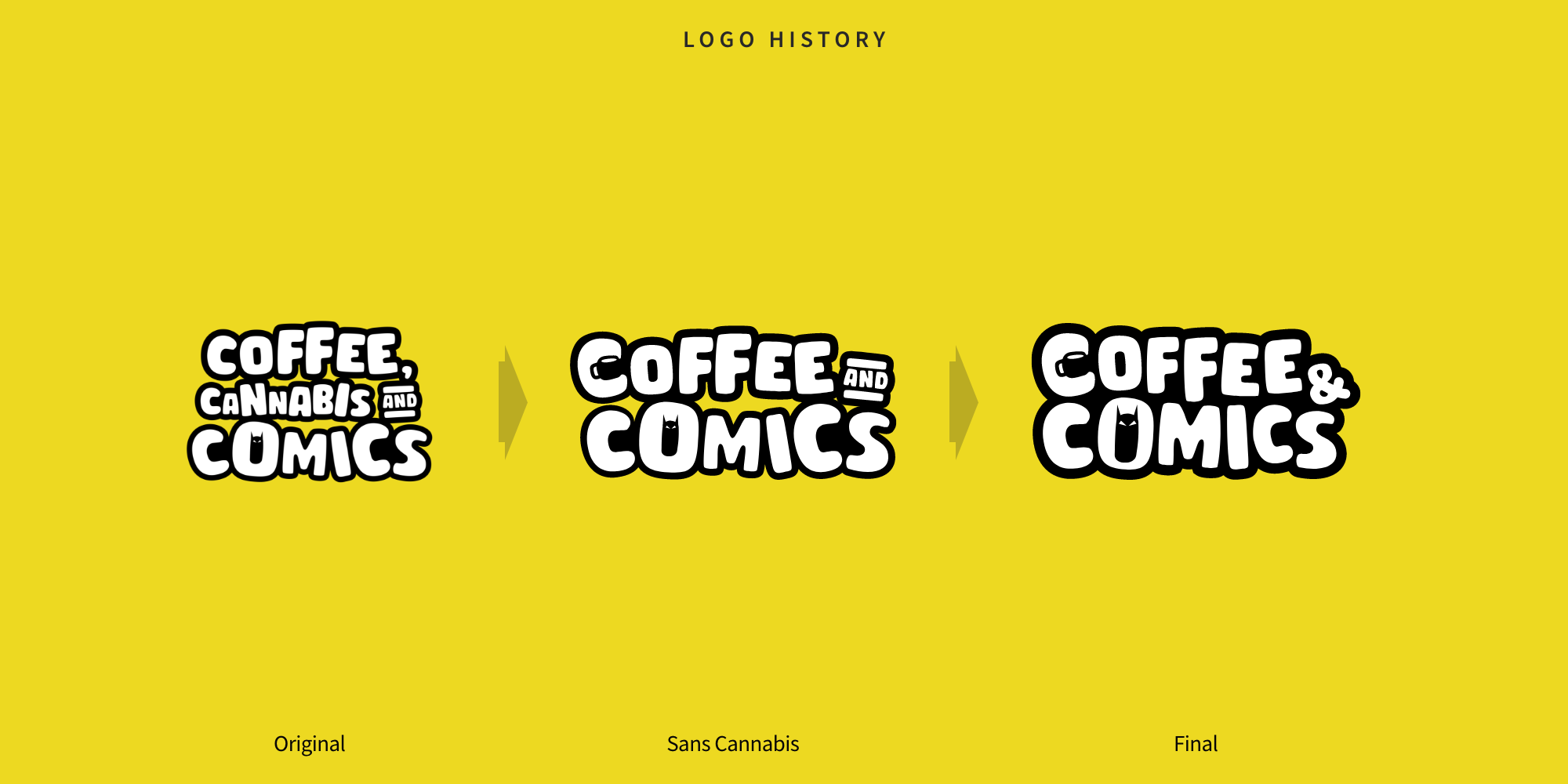
So with all of that happening and getting burnt out from trying new ways to create canna and Chronicle content and failing. I made the conscious decision of removing cannabis from my content strategy. With that came Coffee and Comics. Coffee and comics is an evolution of the original logo I created over a year ago; coffee, cannabis, and comics. Funny thing is, as I worked on this I realized I liked it so much more. A lot of things were fixed that I didn’t like in the original; for instance like the negative spacing in between the words. Then I was able to keep it to two “brand” marks within the whole logo, which is the coffee cup in the C and then the superhero in the O.

Which leads me to the free downloads on my website. While on Threads I started to engage with the comic community while at the same time X-Men ‘97 was premiering on Disney+. Over the course of a couple weeks I noticed that a lot of people were getting upset because other accounts were posting spoilers and they hadn’t watched the episode yet. So I thought I could jump in on this and help out with providing a variety of spoiler images that people could use in their posts as alerts to their audience.

The community responded positively by engaging with it, thus making it the post with the highest engagement on my account. People were thankful, others were joining in on the discussion if you should be posting spoilers in the first place. I wanted to point out though that there are accounts that are monetizing and trying to be the first one out there; so I get it and you’re not gonna be able to stop those people but maybe we can educate them with some best practices so those who don’t want to be spoiled can scroll right past.

You can download this Cable inspired wallpaper here

Analyzing all the engagement on my Threads posts, I started to think OK how can I start converting all of these engagements into leads on my website. What I decided on was wallpapers for mobile phones customized with an X-Men theme. The response to this was the same as the spoiler images: people loved them, shared them over and over. Once again, it became one of my highest engaged posts. 

What I would do is post an image of a mock up of one of the wallpapers. Let that kind of make its way around with people liking it and sharing it, then I would follow up by posting a link to my website. The other point of this was from and SEO perspective. Now I’m not an expert in SEO,  I’m just a designer, but I wanted to see how I can start getting more leads to my website. So by making things free, anyone that is searching for free X-Men related items will hopefully see my posts and I can begging to capture that audience.

Now you might say, “OK so what’s the point? Why? What are you doing with all this traffic?”

Well there’s a couple reasons for that one. I eventually want to start a coffee & comic shop here in my town outside of Denver. So by tackling and taking over all the coffee and comic content in my area, I can start gathering traffic to the website for when we do open.

Hopefully coming to fruition in the next year or so.

By directing people to the free downloads, I’m hoping to encourage them to make purchase. I want to provide just a few items that people can purchase like stickers, a tote bag, maybe even some coffee mugs. These are all things that I’m experimenting with as I am creating them by hand to save on costs.

Then the third reason is just to try to get subscribers to my blog. The blog is going to be another way to capture an audience and try to bring them along on the journey for starting up this coffee and comic shop. Sharing my experience of what’s going on, how I’m doing it all and honestly just being a sort of journal in which I can hold myself accountable on certain things. Plus serve as a place to air out some ideas or frustrations that I’m having and try to brainstorm with my community solutions.

Storm is my current background, which one is your favorite?

At the moment, my free downloads is the highest viewed page on my website and traffic has grown over 3000% in the past month alone. So now you’re probably thinking, “How can you keep this going?” Well it’s pretty simple, make more wallpapers, share more free downloads and just keep the momentum going, it’s not about getting burnt out. It’s about fun and not some immediate deadline. A part of that has to be the comic community I have encountered on Threads, being engaged with such a passionate group really helps keep me going.

 
In Lifestyle Tags freebies, free downloads, X-Men '97, Wallpapers, threads, instagram, content strategy, cannabis, denver, coffee and comics shop, coffee & comics, coffee shop, comic shop
Comment

Tous Les Jours - A Denver Coffee Adventure

May 13, 2024
 

Coffee Date and Research?…

You might be wondering why coffee and comics? Other than enjoying a nice cup of coffee in the morning with a comic book, opening a coffee and comic shop is something I’d like to do in the near future. It’s always a great time going to a comic shop and browsing all the comics, figurines and more; but a lot of the time after I make my purchase I want to sit down and read them. However all comic shops are cramped spaces that are packed to the ceilings with products. Even the Mile High Comics in Denver that is an entire warehouse is packed to the brim and doesn’t offer any seating. With three comic shops being 15-25 minutes away from me, I end up going home to read them instead of going to another establishment to sit and read. Now a coffee and comic shop takes care of that problem by not only providing a space to sit and relax but also providing food and beverages to pair with your comic purchase.

Starbucks plus many other national and global brands have some cities and towns in the palm of their hand by having so many locations and beating out local competition. For instance I live about 20 mins outside of Denver and there are maybe one or two “mom and pop” coffee shops as opposed to multiple Starbucks, Dutch Bros, Caribou Coffee and Ziggy’s Coffee, all national chains. In the 5 years I’ve been living in Colorado I’ve been to Dutch Bros once and Starbucks a few times. I’ve never been to Caribou Coffee or Ziggy’s, but anytime I’ve gone to Starbucks, or driven by the other coffee shops, they’re either empty or just have a drive-thru going.

My wife and I’s order today at Tous Les Jours.

That brings me to the next part of this which is going on coffee adventures with my wife. Before getting into the coffee shop business, we want to do our due diligence and research what makes coffee shops successful in the Denver area and surrounding suburbs. Last week we went to a coffee shop called Sweet Bloom that was really nice but we felt out of place. It seemed like everyone sitting there was on a laptop and there were only a few tables that offered seating for more than two people.

I had to try this, it was so light and fluffy and the cream was rich and tasted super fresh with bits of blueberry in it.

What we did like was the pastries so today I wanted to see what was near us that offered breakfast pastries and I came across Tous Les Jours. This bakery and cafe is located less than 10 mins from our house, in fact once we got there we were thinking it’d be a nice bike ride someday. It is however part of a national chain but we wanted to give it a chance.

A very aesthetically pleasing bakery with a wide variety of pastry options. Savory and sweet, I hit the jackpot. There were so many different items to choose from I had to walk around and look at everything twice before choosing. Everything looked exceptional, freshly baked, fresh and vibrant fruit, it just looked perfect. My wife opted for a latte and almond croissant, I got a hot mocha, a blueberry cream cheese pastry and later went and got an apple filled pastry too.

This apple filled pastry was delicious, I could of eaten at least 4 more.

The hot mocha was delicious and didn’t seem as heavy or thick as opposed to Starbucks. I devoured my first pastry, the bread was so soft and fluffy, the cream filling had bits of blueberry, I finished it in under two minutes. Still hungry, I got an apple filled pastry that was also baked to perfection with a flaky crust and rich apple filling. They had quite a few food options and certainly a place we will be visiting again, especially to try out one of their smoothies. Highly recommend checking this place out if you’re ever in the Denver suburb area.

My hot mocha was very good, not scalding hot and features this little message on the up. Coffee time, refined.

 
In Lifestyle Tags Coffee & Comics, coffee, pastry, pastries, blueberry, cheese cream, apple filling, danish, donuts, Denver, Denver coffee, Denver Cafe, Denver pastries, chocolate almond croissant, Westminster, mocha, hot mocha, coffee adventure, coffee date
Comment

A couple photos of the finished product!

Let's Make a Coffee & Comics Canvas Tote Bag

May 10, 2024
 

How to Customize a Canvas Tote Bag

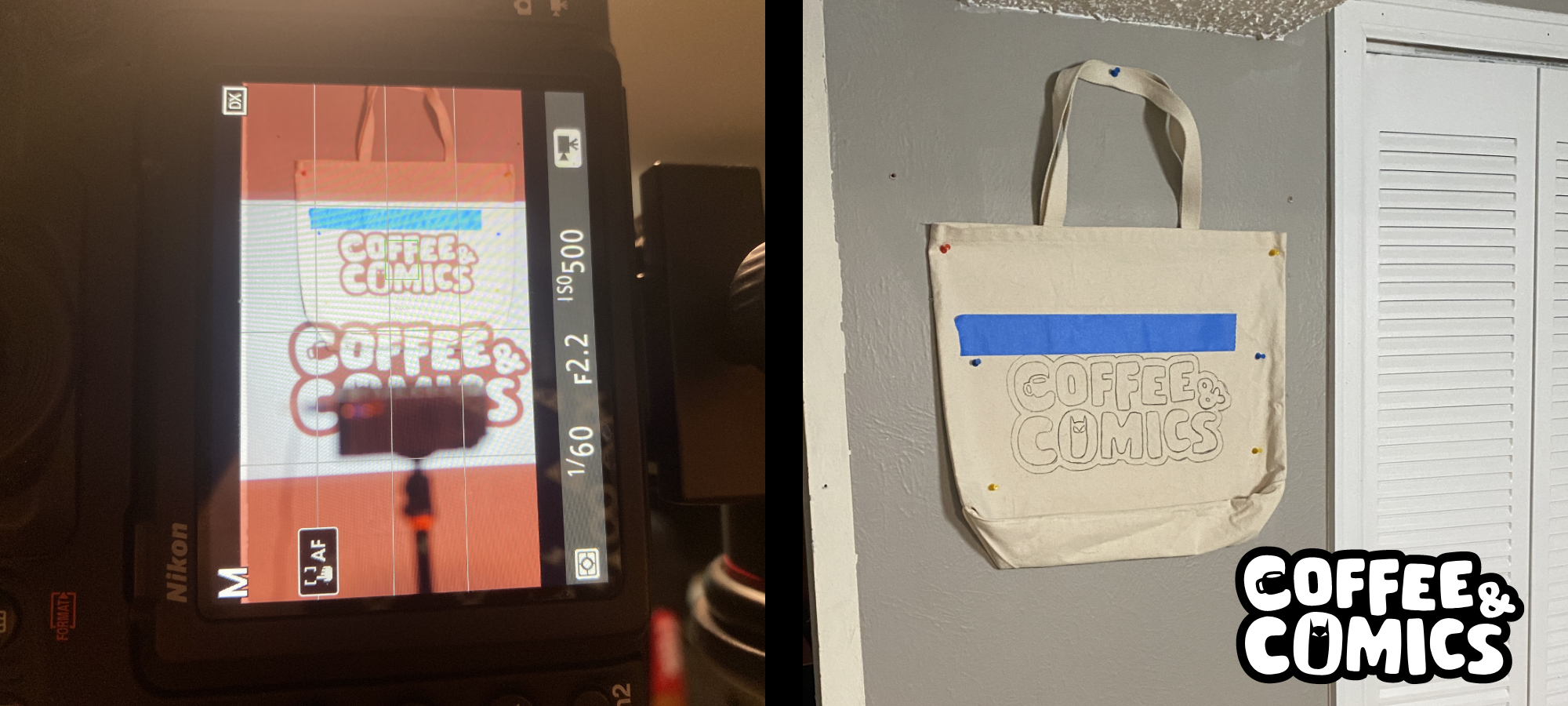
I’ve had this blank tote bag sitting around the house for about 2 years now with the intention to put some type of design on it. Honestly I think the only reason we’ve kept this tote is because of Colorado law having stores charge for plastic bags. Originally I wanted to do something for our canna brand but could never think of a good enough idea. It wasn’t until recently that when I finished revising the Coffee & Comics logo that I was like, “Oh, this would be perfect.” All I really needed to do was create a jpeg with the logo to use with the projector. My projector was a cheap $40 projector from Amazon that I knew would work for this project. My plan was to lightly trace the logo on the wall with a chalk pencil, then take the bag down and fill it in with the marker on a table. Should be easy enough right?

The materials I used but not necessarily needed: old ass fabric markers that I bought a year ago and one of them was completely dried out, a black chalk pencil for outlining, a projector, push pins, tape, cardboard and a ruler.

I started off with trying to figure out how big I wanted the logo to be on the bag. On the computer I put a big and small logo on my artboard so I’d have two options to work with when lining it up on the bag. After I figured that out, I got some tape and placed it from left to right so I could line up the logo with the projector. Once you’re done with that you can place the bag or whatever you’re wanting to trace on up on the wall. What is important in this step is to make sure you can get the bag to lay flat against the wall while you pin it into place. A canvas tote bag is a bit stiff so getting any wrinkles and bumps prior to tracing is highly beneficial. Lining up the projector and focusing the image on the bag is probably the most difficult part. I propped my projector up on an extra tripod so I could place my image higher up on the wall and stand while I trace the logo instead of being crouched or bent over trying to do it low to the ground. 

Now comes the easy or fun part, tracing! Take your chalk pencil and start to outline the logo without pressing too hard on the bag. The benefit of using chalk is that the marker will cover it up but also is easier to remove in case you mess up. On this logo I wanted to make sure the superhero eyes and the coffee cup details don’t get lost with the marker bleeding past the edges, so be extra careful and give your outline a little bit of extra room for the marker. I set up my camera and took a few videos of me doing this, you can find it on my TikTok here. Be aware of where you are walking so as to not to knock over or move the projector once you’ve started or else it will be a pain in the butt to try and line it up again. 

Afterward once you are done outlining it chalk you can take it down and start filling in the logo with your marker or ink. So my markers are about a year or maybe even two years old, but I think this helped in my case as I didn’t have to worry about the marker bleeding. Take a piece of cardboard and stick it in the bag in case the markers bleed through the material and you don’t stain the opposite side. You don’t have to do this extra step but I used some spray glue on the cardboard to adhere to the back of the bag so it wouldn’t move around while filling in with the marker. If you have extra material I would recommend testing out your marker before you start on the final product. Depending on how wet your markers are, this will either be a long or short process. I had to go over the bag a few times to fill in all the little spaces of the material of the bag. In the end it came out better than I expected. This was just a practice run to see if I want to make a few of these to sell on my website. Not sure if I should use anything to “seal” it but if I find anything I will come back and update this post.

Next time I’m going to try different markers and maybe even try fabric paint instead. 

Need a quick run through? See below!

How to trace a design on a tote bag:

  1. Create jpeg with logo to transfer onto projector

  2. Tape a line across bag or whatever you’re using so you can line up logo

  3. Hang bag on the wall with push pins, try to lay flat

  4. Line up logo with projector on the bag

  5. Trace with chalk pencil, careful on details

  6. Remove from wall and place cardboard behind material

  7. Fill in with marker

  8. Stand back and admire your work

 
In Lifestyle Tags Pinterest, crafts, crafting, felt markers, fabric marker, projector project, Coffee & Comics, coffee, comics, tote bag, tote bag print, Pinterest Crafts, Pinterest Ideas, canvas, canvas tote bag
Comment
← Newer Posts

Latest Posts

Featured
Nov 2, 2025
Far Sector - Review - DC Compact Comics
Nov 2, 2025
Nov 2, 2025
Oct 22, 2025
A Little White Rabbit Appears! White Rabbit Coffee Co. Now Open In Westminster CO
Oct 22, 2025
Oct 22, 2025
Sep 27, 2025
Batwoman: Elegy - Review - DC Compact Comics
Sep 27, 2025
Sep 27, 2025
Sep 19, 2025
DCEASED - Review - DC Compact Comics
Sep 19, 2025
Sep 19, 2025
Dec 16, 2024
Gotham Goodies: Batman Comics Mystery Box Unveiled (Part 2)
Dec 16, 2024
Dec 16, 2024
View All

Website by DesignByAlva